
WhatsApp integration for Frappe/ERPNext. Use Meta's WhatsApp Cloud API directly without any third-party integration.


Note: If you're not using live credentials, follow step no 2 to add the number on Meta to which you are sending messages.
- Multi-Account Support - Manage multiple WhatsApp Business accounts
- Two-way Messaging - Send and receive messages with full conversation tracking
- Template Management - Create and sync WhatsApp templates with Meta
- WhatsApp Flows - Build interactive forms using WhatsApp's native Flow Builder
- Interactive Messages - Send button and list messages for quick user responses
- WhatsApp Notifications - Automated notifications triggered by DocType events
- Bulk Messaging - Send campaigns to recipient lists with variable substitution
- Webhook Support - Real-time message delivery and status updates
- Media Support - Send and receive images, documents, videos, and audio files
- Sync from Meta - Import and sync templates and flows from your Meta Business Account
- ERPNext Integration - Native integration with Frappe/ERPNext DocTypes
bench get-app https://github.com/shridarpatil/frappe_whatsappbench --site [sitename] install-app frappe_whatsappVisit Meta Developer Portal to set up your WhatsApp Business API.
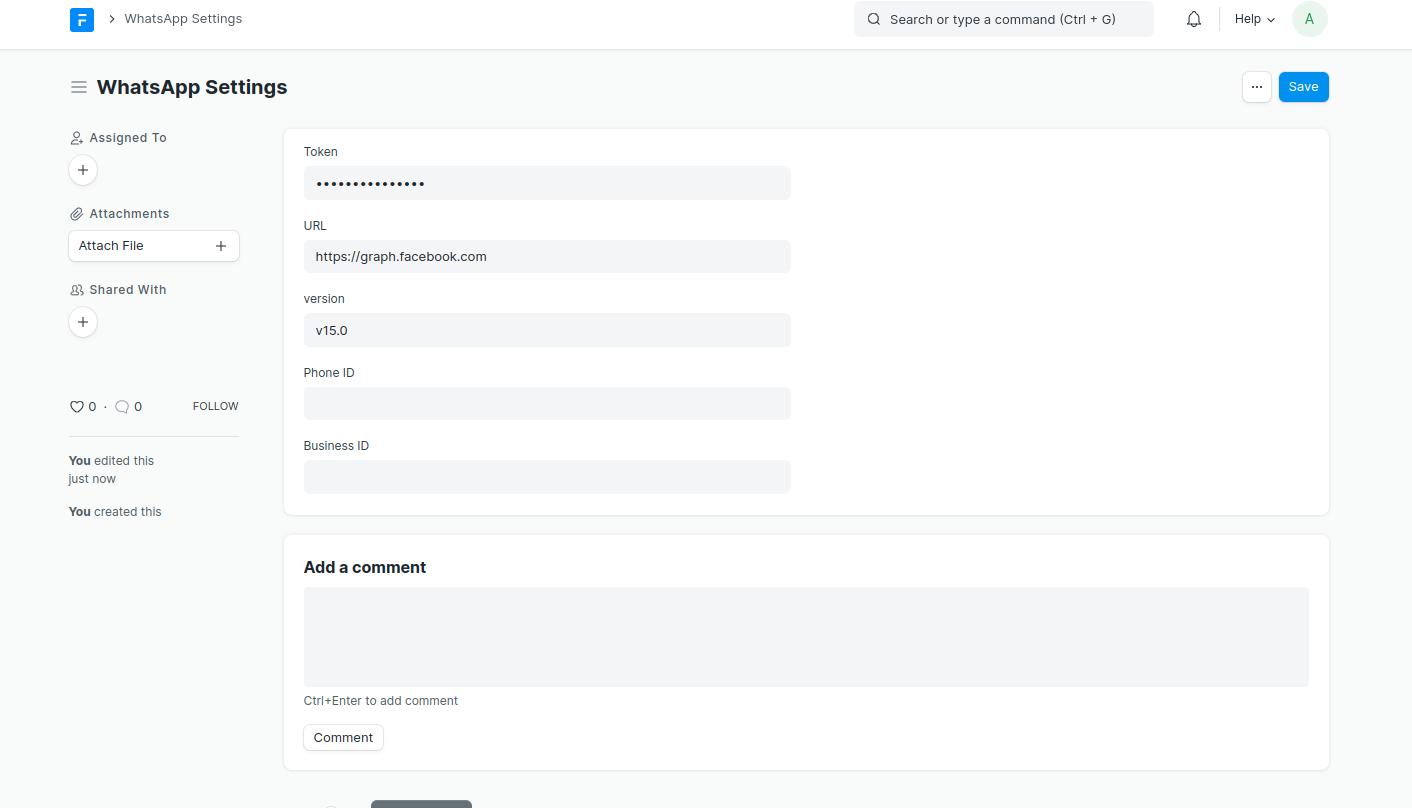
Go to WhatsApp Account in Frappe and enter your credentials:
- Account Name
- Access Token
- Phone Number ID
- Business Account ID
- App ID
- Webhook Verify Token
Create WhatsApp templates that are approved by Meta:

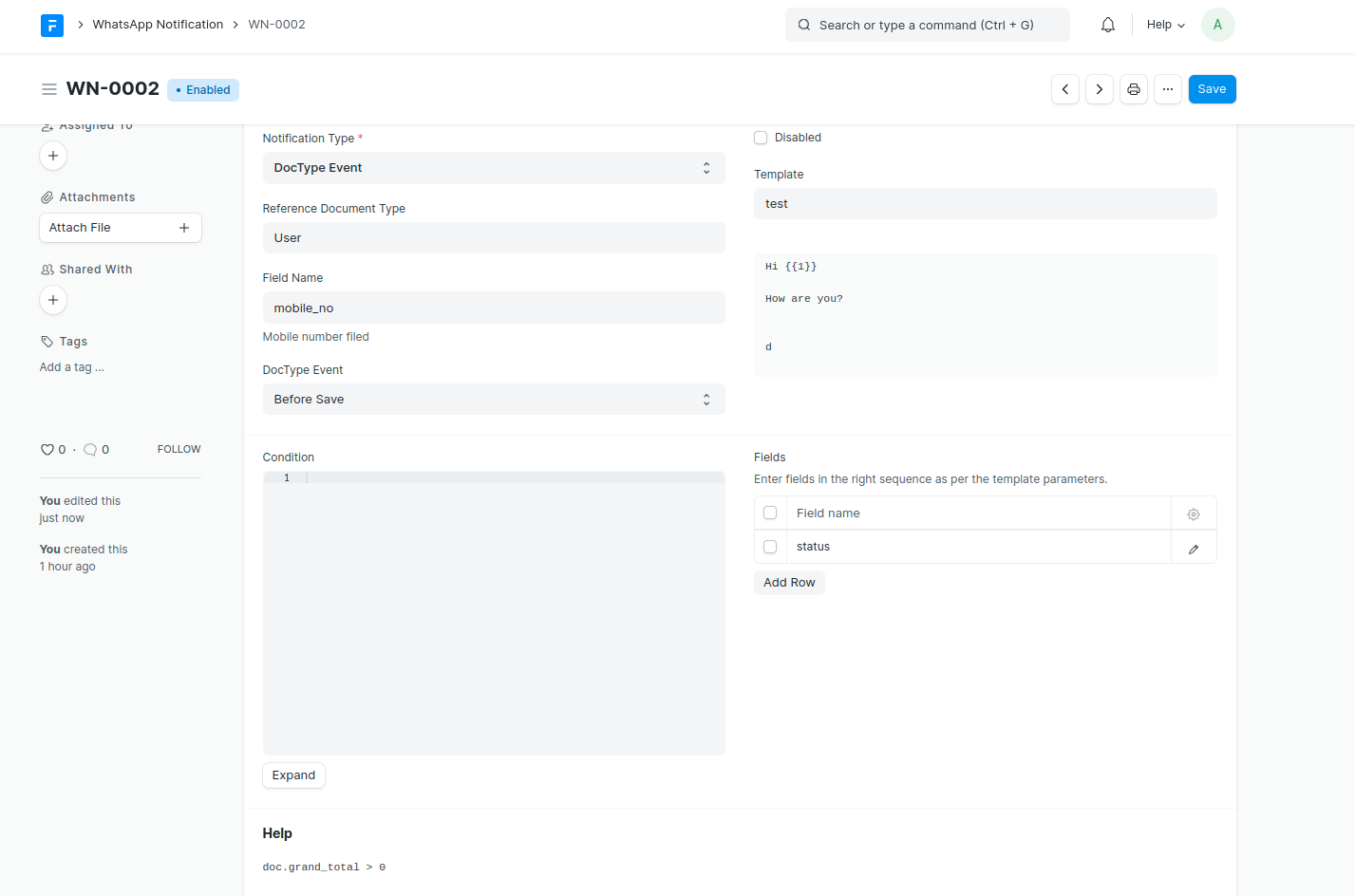
Automatically send WhatsApp messages based on DocType events.
Supported Triggers:
- DocType Events: Before/After Insert, Validate, Save, Submit, Cancel, Delete
- Scheduler Events: Hourly, Daily, Weekly, Monthly
- Date-based: Days Before/After a specified date field
Features:
- Map template parameters to DocType fields
- Add conditions using Python expressions
- Attach document print PDFs or custom files
- Set DocType field values after sending (e.g., mark as notified)
- Support for interactive buttons with dynamic URLs
Send WhatsApp messages to multiple recipients at once.
Features:
- Import recipients from any DocType (Customer, Contact, etc.)
- Create recipient lists for reuse
- Variable substitution from recipient data
- Background processing with progress tracking
- Retry failed messages
- Select specific WhatsApp account for sending
Recipient Types:
- Individual Recipients - Add recipients directly with their phone numbers
- Recipient List - Use a pre-configured WhatsApp Recipient List
Variable Types:
- Common - Same values for all recipients
- Unique - Different values per recipient (from recipient data)
Send messages without templates (within 24-hour window):

Send interactive button and list messages for quick user responses.
Button Messages:
- Up to 3 quick reply buttons
- Users tap to respond instantly
- Great for confirmations, options, and CTAs
List Messages:
- Up to 10 items organized in sections
- Users select from a menu
- Ideal for product catalogs, service menus, FAQs
Build interactive forms using WhatsApp's native Flow Builder. Flows provide a rich UI experience for collecting structured data from users.
Features:
- Visual form builder with multiple screens
- Support for text inputs, dropdowns, date pickers, and more
- Client-only flows (no endpoint required)
- Publish and manage flows directly from Frappe
- Send flow messages and receive responses via webhook
Supported Field Types:
- TextInput, TextArea
- Dropdown (with static options)
- DatePicker
- RadioButtonsGroup, CheckboxGroup
- OptIn
- Text display components (TextHeading, TextBody, TextSubheading, TextCaption)
Flow Actions:
- Create on WhatsApp - Push new flows to Meta
- Upload Flow JSON - Update flow definition
- Publish - Make flow available to all users
- Deprecate - Mark flow as deprecated
- Send Test - Test draft flows with registered test numbers
- Sync from Meta - Import existing flows back to Frappe
Keep your Frappe data synchronized with your Meta Business Account.
Templates:
- Go to WhatsApp Templates list view
- Click Sync from Meta button
- All templates from active WhatsApp accounts are imported/updated
Flows:
- Go to WhatsApp Flow list view
- Click Sync from Meta button
- Select the WhatsApp Account to sync from
- New flows are imported, existing flows are updated with latest status and JSON
Send templates using custom data instead of DocType fields:
doc.set("_data_list", [
    {"phone": "+1234567890", "name": "John", "order_id": "ORD-001"},
    {"phone": "+0987654321", "name": "Jane", "order_id": "ORD-002"}
])
- Go to your Meta Developer App
- Set Webhook URL:
<your-domain>/api/method/frappe_whatsapp.utils.webhook.webhook - Add Verify Token (same as in WhatsApp Account settings)
- Subscribe to webhook fields:
messages- to receive incoming messagesmessage_template_status_update- for template status updates
Messages received via webhook are automatically created as WhatsApp Message documents:

Manage multiple WhatsApp Business accounts for different use cases:
- Set default accounts for incoming and outgoing messages
- Select specific accounts when sending bulk messages
- Route notifications through designated accounts
- Auto-read receipts per account
Enhance your WhatsApp experience with these companion apps:
A chat app for Frappe Desk to manage WhatsApp conversations.
| Features | Real-time messaging, media support, contact management, read receipts |
| Install | bench get-app https://github.com/shridarpatil/whatsapp_chat |
| Marketplace | |
| Use Cases | Customer conversations, sales follow-ups, support tickets |
Build automated chatbots with flows, keyword replies, and AI-powered responses.
| Features | Multi-step flows, keyword matching, AI fallback (OpenAI/Anthropic/Google), session management |
| Install | bench get-app https://github.com/shridarpatil/frappe_whatsapp_chatbot |
| Marketplace | |
| Use Cases | Customer support, order status, appointment booking, lead capture |
For detailed documentation, visit https://shridarpatil.github.io/frappe_whatsapp/
Contributions are welcome! Please feel free to submit a Pull Request.
MIT


